The Modern Language Association (MLA) does not require you to create a cover page when you complete your research paper, but some instructors may require it.
If your instructor requires your paper to have a cover page, here is how to make it (very easy). This cover page should include: your school name, your research paper title, your name, your class, your professor name and your paper due date.
How to Format Your MLA Cover Page:
- This page is double spaced and the letters are centered.
- Font: Times New Roman
- Font size: 12
- The first letter of each word should be capitalized with the exception of very short words such as: the, and, of, or, a, an, in, to, for. Note: the first letter of the first word should be capitalized, regardless of what kind of word it is.
- Type the name of your university or college.
- Skip to about one-third of the page and type your research paper title, include a subtitle if you have.
- Skip several lines down and type your name, your course name and number, your instructor name and your paper’s due date.
Sample MLA Format Cover Page:
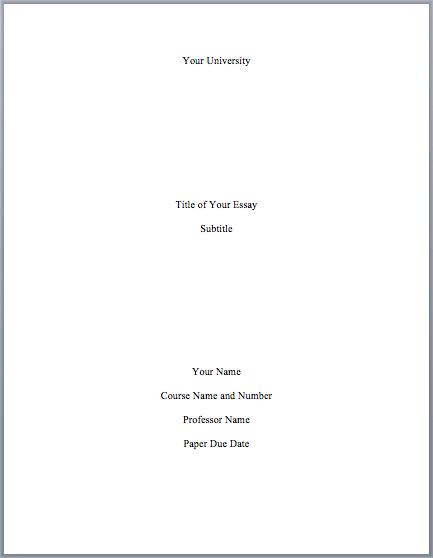
Sample MLA Format Cover Page
Alternate First Page:
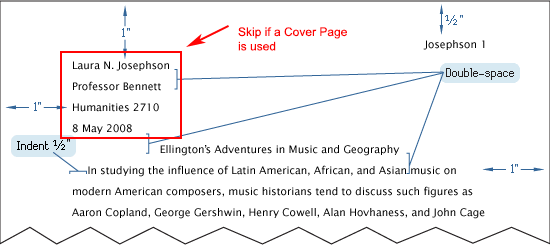
If your instructor requires a cover page, you would omit the main heading on your first page. Here is an example of the first page if a cover page is used. You still need your last name and page number on the first page and every other page.
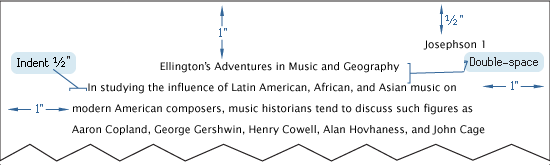
Sample MLA Format First Page with Cover Page
More Info
Sample MLA Paper:
Visit here for a sample paper with the cover page. The cover page can vary slightly. This paper also has the outline page for your sample.
How do I get the header on the second page on down? I tried editing it but then it takes the header away from all the pages.
In word select the header then go to: Header & Footer>Page Number>Format Page Numbers>Page Numbering>Start at page>Set to 0
How do I get the header on the second page on down? I tried editing it but then it takes the header away from all the pages. I am using windows. Also, the page numbers are not working for me either. Please help me.
How should I start the page after my cover page?
https://mlaformat.org/mla-format-heading/
Thanks man
thx
thankyou
Thank you so much Stephen !!! Helped a lot in my written assignments 🙂
Great site ! Thank you so much. Just returned to school to complete my bachelors and needed a little refreshing. Has all the information I needed !
Thanks so much for all of the great information! I have not used MLA before and was a little panic stricken. I have found all of my answers here. This is now saved to my favorites so I can use it regularly.
Thanks again!
Should the lines on the cover page be double spaced?
Thanks.
Thanks so much for the picture of the cover page it has helped a lot. But, I was wondering do I still need to put my Title at the top of every page after the header?
Hello Lydia. You do not.
After your cover page, your next page’s heading should look like the “Alternate First Page” above.
After the “Alternate First Page” => your next pages should have “The Inner Pages” heading: https://mlaformat.org/mla-format-heading/
Sample paper: https://mlaformat.org/mla-format-sample-paper-with-cover-page-and-outline/
hey Lydia you don’t need to but if you want to you can
Thank you so so much. I love the simplicity of the website, very easy to understand. I finally have a cover page for my paper!!
I love this website!! It helped so many times with all my essays. I’m working on a college one and this was very useful. Thank you soo much. And thanks for the examples im a visual person I needed that 🙂
Hi Kaylin, I am glad you find this site useful. Take care!
By the way (sorry i forgot!) for the coverpage, would the text font be 12 times new roman???
You can set everything 12, Times New Roman. Or you can set the Title a little larger than 12, that should work too.
In the example above, I have the title larger than 12.
Here is an example with everything set at 12.
Thank you so much for your help on this useful website! I found it very organized and I’m very glad that I came across this particular article. Thanks!!!!!!!:)
Hello,
I have a question regarding the cover page and the following pages. If I have a cover page as the example provided, do I still need the heading on the next page? And should the pages after that contain my last name on the top left as the header does on the on the previous pages? or do I not need the header at all if I have the cover page and just my name?
Thank you.
Excellence question, Stella! I have updated this article with information on the first page if a cover page is used. Please see “Alternate First Page” above.
You can omit the main heading but you still need your last name and page number on the first page and all subsequent pages. Take care!